Threat Modeling: A Complete How-To Guide
Identify and manage security risks in software architecture

Introduction
The cornerstone of building secure systems is the use of threat modeling early in the development lifecycle. Threat modeling provides a structured approach to analyze system architecture, identify threats and apply mitigations.
This document introduces threat modeling and why it is necessary. It explores various industry-standard methodologies used for threat modeling. The key concepts and steps involved in performing threat modeling are discussed in detail. Additionally, the document provides information on the open-source and commercial tools available for performing threat modeling and performs a cost-effectiveness analysis on these options
Definition – What is Threat Modeling?
Threat modeling is a systematic assessment of the diagrammatic representation of both cyber and physical systems to identify, understand and communicate threats, associated risks and possible mitigations. Threat modeling is often utilized during the design and development phases of a product or technology and is repeated when significant modifications to the system architecture occur.
Threat Modeling – Key Concepts
Asset: These are the sensitive data, systems, or resources that an attacker may target. Assets can be physical, logical, or intangible, and their value determines the level of protection needed.
Data Flow: It refers to the movement of sensitive information from one system or component to another along with the direction indicated by arrows. Data flow is usually augmented by protocol used, data type, and authentication and authorization information.
Entry Points and Exit Points: In threat modeling, entry points refer to the ways that an attacker can initially gain access to an asset or system. Examples include network interfaces (e.g., Ethernet, Wi-Fi), user authentication systems, and physical access points (e.g., doors, key card readers). Exit points are the ways that data or assets can be removed from a system. Examples include data backups, file transfers, and network connections. (e.g., FTP, HTTP).
Trust Boundary: A trust boundary is a logical or physical separation that defines the perimeter of an asset or system. It identifies where the boundaries between different environments, networks, or systems begin and end. Trust boundaries can take many forms, including:
Network Segments: Physical or logical divisions within a network that restrict access to certain segments or zones.
System Isolation: Logical or physical separation between different systems or components, such as firewalls, VLANs, or isolated networks.
Role-Based Access Control (RBAC): Authorization models that restrict access to specific resources based on user roles and permissions.
Scope: This refers to the specific area of interest in threat modeling. The scope defines what assets, systems, or data are being protected, and what threats need to be considered.
Threats: These are potential attacks, vulnerabilities, or exploitation that could compromise an asset or system. Threats can come from various sources, such as malicious actors, natural disasters, or systemic failures. Threat modeling frameworks are used to systematically identify and analyze threats.
Attack Vectors: These are the specific methods or channels through which an attacker might launch a threat. Examples include network connections, interfaces, APIs, social engineering, and physical access.
Interactors: An Interactor is an external entity that interacts with the system being modeled. It represents a person, organization, or system that can affect the system's behavior or be affected by it.
Data Flow Diagram: A Data Flow Diagram (DFD) is a graphical representation of the flow of data through a system, showing how data is processed and transformed as it moves through various components and interactions. DFDs are used to identify potential threats and vulnerabilities by visualizing the flow of data between different parts of the system.
The below image shows a representation of the symbols and elements that can be used to model the data flow diagram.

The below threat model diagram shows an example architecture created by CNCF Financial Services User Group.
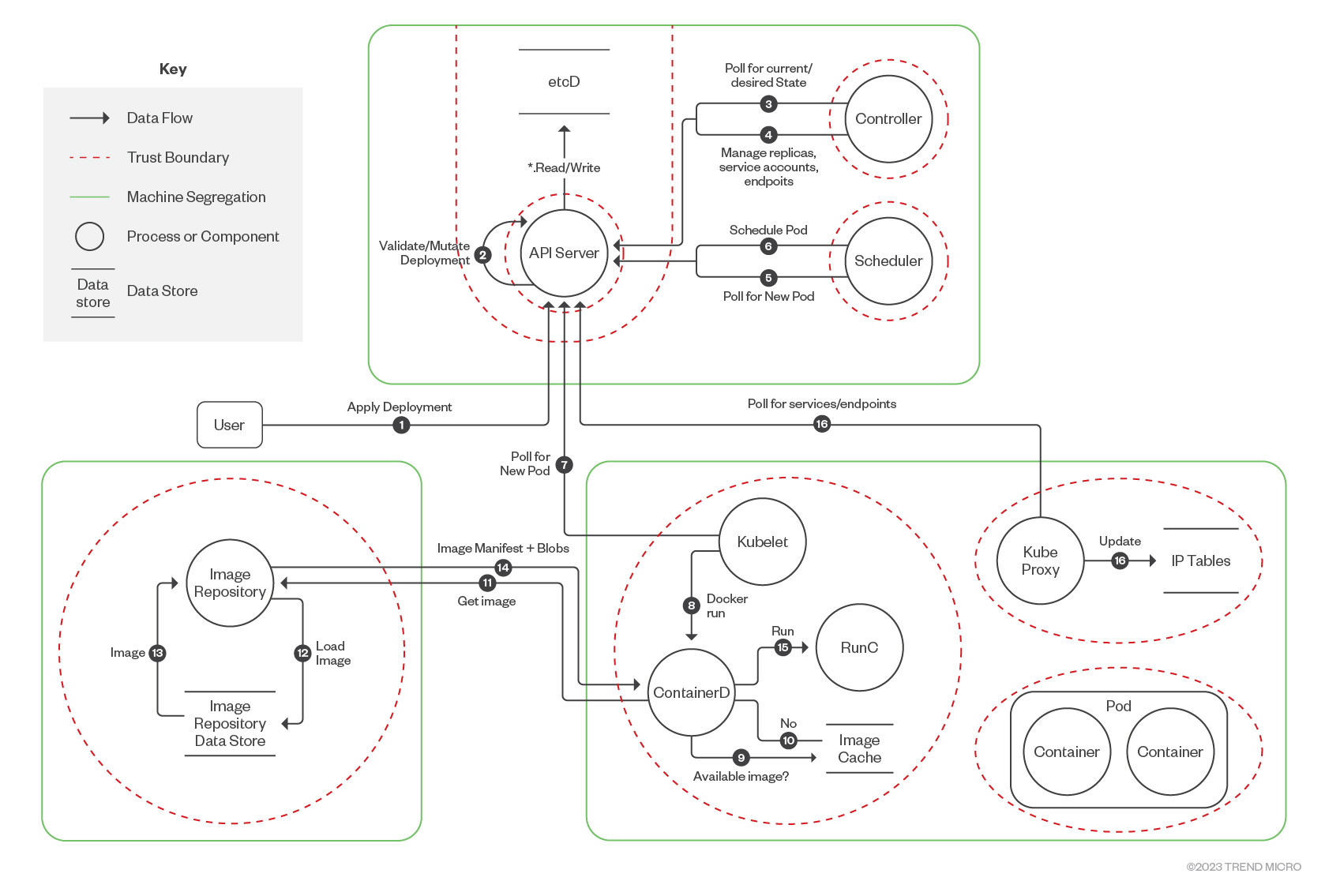
Threat Modeling Implementation Process
System Modeling - Overview
The step of system modeling seeks to understand a system thoroughly by identifying and mapping all relevant components and this step provides a critical foundation for subsequent activities. Although different techniques may be used in this first step of threat modeling, data flow diagrams (DFDs) are arguably the most common approach. DFDs allow one to visually model a system and its interactions with data and other entities; they are created using a few simple symbols.
Depending on the scale and complexity of the system being modeled, multiple DFDs may be required. For example, one could create a DFD representing a high-level overview of the entire system along with a number of more focused DFDs which detail sub-systems. DFDs must provide a clear view of trust boundaries, data flows, data stores, processes, and the external entities which may interact with the system. These often represent possible attack points and provide crucial input for the subsequent steps. The following process can be used to create data flow diagrams.
Steps to perform system modeling
Scope identification: Identify the target product and its components that need to be modeled and assessed. Understand the product architecture and how the different components interact with each other and with the external entities (such as customers using web browser, software developers, system administrators and other IT systems using public APIs.)
Mapping the components: The core components of the product (such as Frontend web-interface, backend APIs, Access Management solutions) are represented in the data flow diagram.
Adding Data Stores: Identify the ephemeral and persistent storage locations used by the application or IT system, such as databases or disk storage.
Identifying the external entities: Identify the external entities that interact with the system. These may include customers, software developers, system administrators, and other IT systems using public APIs.
Defining the trust boundaries: Define the trust boundaries between the different components and external entities. This includes identifying the boundaries that separate the different environments, networks, or systems.
Identifying the data flows: Identify the data flows between the different components and external entities. This includes identifying the data that is transferred between them, the direction of the data flow, and the protocols used.
Threat modeling frameworks
Adam Shostack’s Four-Question Framework
A concise process pioneered by Adam Shostack, an expert in the threat modeling industry. This framework attempts to breakdown threat analysis in easy-to-interpret, open-ended questions. The four questions are as follows:
What are we working on? Understand the system or project you’re dealing with. Identify its components, boundaries, and purpose.
What can go wrong? Explore potential threats, vulnerabilities, and attack vectors. Consider various scenarios that could compromise security.
What are we going to do about it? Develop mitigation strategies. Decide how to address identified risks, whether through design changes, controls, or other measures.
Did we do a good job? Continuously assess and improve your threat modeling process. Strive for ongoing refinement and effectiveness.
Amazon’s threat-composer, a threat modeling tool, utilizes this framework to help engineers identify useful and actionable threats and provides insights to improve the quality and coverage of the threat modeling practice iteratively.
STRIDE Framework
The STRIDE model is an extremely popular threat identification technique introduced by Microsoft and in the publicly available and widely adopted tool: Microsoft Threat Modeling tool. STRIDE methodology is defined as follows:
Spoofing identity. An example of identity spoofing is illegally accessing and then using another user's authentication information, such as username and password.
Tampering with data. Data tampering involves the malicious modification of data. Examples include unauthorized changes made to persistent data, such as that held in a database, and the alteration of data as it flows between two computers over an open network, such as the Internet.
Repudiation. Repudiation threats are associated with users who deny performing an action without other parties having any way to prove otherwise—for example, a user performs an illegal operation in a system that lacks the ability to trace the prohibited operations. Non-repudiation refers to the ability of a system to counter repudiation threats. For example, a user who purchases an item might have to sign for the item upon receipt. The vendor can then use the signed receipt as evidence that the user did receive the package.
Information disclosure. Information disclosure threats involve the exposure of information to individuals who are not supposed to have access to it—for example, the ability of users to read a file that they were not granted access to, or the ability of an intruder to read data in transit between two computers.
Denial of service. Denial of service (DoS) attacks deny service to valid users—for example, by making a Web server temporarily unavailable or unusable. You must protect against certain types of DoS threats simply to improve system availability and reliability.
Elevation of privilege. In this type of threat, an unprivileged user gains privileged access and thereby has sufficient access to compromise or destroy the entire system. Elevation of privilege threats include those situations in which an attacker has effectively penetrated all system defenses and become part of the trusted system itself, a dangerous situation indeed.
DREAD Framework
Another risk assessment framework introduced by Microsoft that was conceived of as an add-on to the STRIDE model that allows modelers to rank threats once they’ve been identified. DREAD stands for five questions you would ask about each potential threat:
Damage – how bad would an attack be?
Reproducibility – how easy is it to reproduce the attack?
Exploitability – how much work is it to launch the attack?
Affected users – how many people will be impacted?
Discoverability – how easy is it to discover the threat
VAST Modeling
The Visual, Agile, and Simple Threat (VAST) modeling method was created based on ThreatModeler, an automated threat modeling platform. The fundamental value of the method is the scalability and usability since it is designed to integrate into workflows built around the DevOps philosophy. Recognizing differences in operations and concerns among development and infrastructure teams, VAST requires creating two types of models: application threat models and operational threat models.
Application threat models use process flow diagrams, representing the architectural point of view.
Operational threat models are created with an attacker point of view in mind based on DFDs.
Process for Attack Simulation and Threat Analysis (PASTA) Framework
The Process for Attack Simulation and Threat Analysis (PASTA) is a risk-centric threat modeling framework used in organizations such as GitLab as their internal threat modeling standard. PASTA is a risk-centric threat modeling methodology that allows for collaboration between developers and business stakeholders to truly understand your application’s inherent risk, its likelihood of attack, and the business impact if there was a compromise.
PASTA is based on seven distinct steps as shown in the below diagram:

Enumerate Attack Vectors and Identified Threats
Leveraging existing frameworks such as MITRE ATT&CK, CAPEC and CWE will provide a standardized way to categorize potential attack vectors, common attack patterns and software weaknesses.
MITRE ATT&CK
The MITRE ATT&CK framework (MITRE ATT&CK) is a universally accessible, continuously updated knowledge base for modeling, detecting, preventing and fighting cybersecurity threats based on cybercriminals’ known adversarial behaviors. It is populated mainly by publicly available threat intelligence and incident reporting, as well as by research on new techniques contributed by cybersecurity analysts and threat hunters. MITRE ATT&CK catalogs cybercriminal tactics, techniques and procedures (TTPs) through each phase of the cyberattack lifecycle—from an attacker's initial information gathering and planning behaviors, through to the ultimate execution of the attack which can be used to identify potential attack vectors in threat models. Link to the matrix of tactics and techniques used against Industrial Control Systems (ICS) can be found here: https://attack.mitre.org/matrices/ics/
Common Attack Pattern Enumeration and Classification (CAPEC)
CAPEC offers a structured approach to identifying and analyzing attack patterns. It focuses on application security and describes the common attributes and techniques employed by adversaries to exploit known weaknesses in cyber-enabled capabilities. The information in a CAPEC profile is extensive. For example, CAPECs include an ID for tracking and correlation, attack name, high-level description, attack execution procedure, attack prerequisites, severity scope and score, attacker skill requirements, attack success rates, and mapping to CWE (Common Weakness Enumeration).
Common Weakness Enumeration (CWE)
CWE provides a common language and framework for classifying software weaknesses. A “weakness” is a condition in a software, firmware, hardware, or service component that, under certain circumstances, could contribute to the introduction of vulnerabilities. The objective of the CWE is to eliminate potential vulnerabilities by identifying the most common errors made by developers and engineers so that they avoid these problems in the products and systems they build. The list of CWEs is organized with a taxonomy that makes it easier to find, identify and describe these weaknesses in a way that is easily understood by the entire community.
Response and Mitigations
Categorizing identified threats using CVSS
Threats can be categorized based on their likelihood of occurrence, potential impact, and the level of risk they pose using CVSS metrics. It allows us to quantify risk and objectively assess and mitigate threats. The Common Vulnerability Scoring System (CVSS) is an industry standard framework for communicating the characteristics and severity of software vulnerabilities. The latest version, CVSS 4.0 consists of four metric groups: Base, Threat, Environmental, and Supplemental. The official CVSS 4.0 calculator is available at https://www.first.org/cvss/calculator/4.0# The CVSS score of the threat will be used to determine the severity level and the identified threats can be prioritized based on its corresponding severity level.
Applying countermeasures and threat mitigations
Equipped with an understanding of both the system and applicable threats, it is now time to address them. Each threat identified earlier must have a response. Threat responses are similar, but not identical, to risk responses. The following are different response plans:
Avoid (resolve)
Mitigate (reduce)
Accept
Transfer
If one decides to mitigate a threat, mitigation strategies must be formulated and documented as requirements. Depending on the complexity of the system, nature of threats identified, and the process used for identifying threats (STRIDE or another method), mitigation responses may be applied at either the category or individual threat level. In the former case, the mitigation would apply to all threats within that category.
Mitigations strategies must be actionable not hypothetical; they must be something that can actually be built into to the system being developed. Although mitigations strategies must be tailored to the particular application, the resources provided below can prove valuable when formulating these responses.
MITRE D3FEND
MITRE D3FEND is a knowledge base that serves as a library of defensive cybersecurity countermeasures, technical components, and their associations and capabilities. It is complementary to the MITRE ATT&CK framework of cybercriminals’ Tactics, Techniques, and Procedures (TTP) introduced earlier. The knowledge-graph of the cybersecurity countermeasures are located here: https://d3fend.mitre.org/
OWASP Cheat Sheet Series
The Open Worldwide Application Security Project (OWASP) is an online community that produces freely available articles, methodologies, documentation, tools, and technologies in the fields of IoT, system software and web application security. The OWASP Cheat Sheet Series provides a concise collection of high value information on specific application security topics. These cheat sheets were created by various application security professionals who have expertise in specific topics. This information is highly valuable to identify proper mitigation and security controls for application vulnerabilities. The OWASP documentation can be found here: https://cheatsheetseries.owasp.org/index.html
Microsoft Threat Modeling Tool mitigations
The Threat Modeling Tool mitigations are categorized according to the Web Application Security Frame, which consists of the following:
| Category | Description |
| Auditing and Logging | Who did what and when? Auditing and logging refer to how your application records security-related events |
| Authentication | Who are you? Authentication is the process where an entity proves the identity of another entity, typically through credentials, such as a username and password |
| Authorization | What can you do? Authorization is how your application provides access controls for resources and operations |
| Communication Security | Who are you talking to? Communication Security ensures all communication done is as secure as possible |
| Configuration Management | Who does your application run as? Which databases does it connect to? How is your application administered? How are these settings secured? Configuration management refers to how your application handles these operational issues |
| Cryptography | How are you keeping secrets (confidentiality)? How are you tamper-proofing your data or libraries (integrity)? How are you providing seeds for random values that must be cryptographically strong? Cryptography refers to how your application enforces confidentiality and integrity |
| Exception Management | When a method call in your application fails, what does your application do? How much do you reveal? Do you return friendly error information to end users? Do you pass valuable exception information back to the caller? Does your application fail gracefully? |
| Input Validation | How do you know that the input your application receives is valid and safe? Input validation refers to how your application filters, scrubs, or rejects input before additional processing. Consider constraining input through entry points and encoding output through exit points. Do you trust data from sources such as databases and file shares? |
| Sensitive Data | How does your application handle sensitive data? Sensitive data refers to how your application handles any data that must be protected either in memory, over the network, or in persistent stores |
| Session Management | How does your application handle and protect user sessions? A session refers to a series of related interactions between a user and your Web application |
In-depth information about the mitigation strategies for each of the categories can be found here: https://learn.microsoft.com/en-us/azure/security/develop/threat-modeling-tool-mitigations
Documentation and Reporting
Once threats and corresponding countermeasures are identified, it is possible to develop a threat profile with the following criteria:
Non-mitigated threats: Threats which have no countermeasures and represent vulnerabilities that can be fully exploited and cause an impact.
Partially mitigated threats: Threats partially mitigated by one or more countermeasures and can only partially be exploited to cause a limited impact.
Fully mitigated threats: These threats have appropriate countermeasures in place and do not expose vulnerabilities.
The risk and potential impact of the partially mitigated and non-mitigated threats are aggregated and summarized. The final report is presented to the relevant stakeholders and management for review.
The reviewers generally consider the organization’s risk appetite, applicable industry regulations, legal implications and the overall business goals of the product to ensure that the reported risk level is in the acceptable range or if further actions are required to improve the product’s security posture.
Threat Modeling Tools
Following are some open-source and commercial tools available for automating some aspects of performing threat modeling.
Commercial tools:
IriusRisk
ThreatModeler
SD Blueprint by Security Compass
Open-source or free to use tools:
Cairis
OWASP Threat Dragon
Threagile
Microsoft Threat Modeling Tool
OWASP pytm
Amazon’s threat-composer
SeaSponge
Comments
Join the discussionNo comments yet. Be the first to comment.